
How to Connect Affiliate Platforms with CRM and Revenue Ops: HubSpot, Salesforce and Offline Conversions

Introduction
Affiliate programs generate volume quickly, but volume alone does not create revenue intelligence. When affiliate data lives inside a partner platform while lead qualification, pipeline, and closed-won outcomes live inside a CRM, the business loses analytical continuity. Marketing sees clicks and registrations, sales sees contacts and deals, and Revenue Operations sees fragmented reports instead of one commercial system. That gap weakens attribution, distorts partner evaluation, and makes budget decisions less reliable.
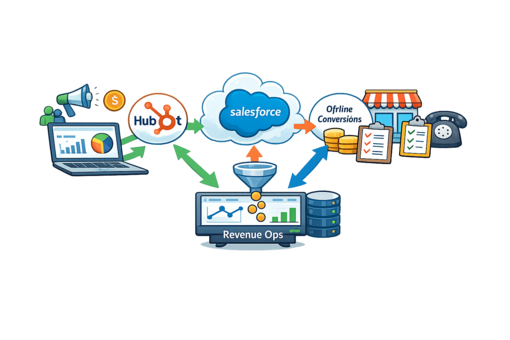
This guide explains how to connect affiliate platforms with CRM and Revenue Ops — in HubSpot and Salesforce — how offline conversions flow back to acquisition channels, which fields to sync, and which integration model fits your stack. The goal is a closed loop from partner click to closed revenue, so traffic is judged by qualified pipeline and won business rather than raw submissions. For definitions of any terms below, the affiliate marketing glossary is a useful companion.
Affiliate Attribution, Offline Conversions & CRM Integration: Definitions
Three terms sit at the center of this topic. Clear definitions make the rest of the workflow easier to design and are the fastest way to align marketing, sales, and RevOps on the same language.
These three ideas depend on each other. Attribution is the question; CRM integration supplies the data continuity to answer it; offline conversions close the loop by returning downstream outcomes to the source. When last-click logic starts to break as programs scale, this is usually where the cracks appear — a topic we cover in detail in why last-click attribution breaks when affiliate programs scale.
Why Affiliate Data Must Be Connected to CRM and Revenue Ops
Affiliate platforms are effective at measuring upper-funnel actions: clicks, registrations, lead submissions, and conversion events defined inside the partner ecosystem. Those metrics are useful for campaign control, but they do not answer the commercial question that matters most: which affiliates produce revenue, not just traffic. Without CRM connectivity, the business cannot reliably separate a partner that generates high lead volume from one that generates qualified pipeline.
Revenue Operations depends on continuity across systems. It needs the same lead to be visible from original click through contact creation, sales qualification, opportunity stage changes, and closed revenue. When affiliate data is isolated from CRM and RevOps workflows, finance and growth teams lose the ability to model cost per qualified lead, cost per opportunity, source-to-revenue conversion, and partner-specific return on ad spend. The problem compounds as the company scales across multiple affiliates, geographies, and sales teams.
Disconnected workflows create predictable problems:
- source performance is judged by lead count rather than revenue contribution;
- sales teams cannot see the original acquisition context for inbound records;
- partner commissions are built on shallow events instead of validated outcomes;
- funnel reporting breaks between marketing and sales systems;
- revenue forecasting uses incomplete source attribution.
The operational cost is substantial: a company can overpay weak publishers, underinvest in strong ones, and misread the true economics of its channels. Connecting affiliate data to CRM is therefore not a reporting luxury but a control mechanism that protects margin and creates a shared performance language across marketing, sales, finance, and BI. Once that continuity exists, teams can optimize traffic on SQL rate, opportunity creation, deal velocity, approval rate, or any downstream KPI that reflects real commercial value — the same KPIs covered in our guide to affiliate marketing KPIs.
The Data Flow: From Affiliate Click to Closed Revenue
A working integration is a loop, not a one-way export. Acquisition data flows forward into the CRM; revenue outcomes flow back to the affiliate platform for optimization and payouts. The simplified path looks like this:
| 1. Affiliate click affiliate ID, sub-ID, click ID, GCLID/FBCLID |
→ | 2. Lead event postback / S2S / API |
→ | 3. CRM record contact, lifecycle, opportunity |
→ | 4. Revenue Ops SQL, closed-won, deal value |
| ↺ Offline conversions sent back to the affiliate platform (and to Google Ads / Meta) for commission logic and bid optimization | ||||||
Two design principles keep this loop intact. First, acquisition identifiers must survive every handoff — the click ID captured on the landing page has to reach the CRM contact and be inherited by the opportunity. Second, downstream events (qualified, won, funded) must be returned to the source, or optimization stays blind to what actually converts. When either principle is dropped, the chain breaks and source-to-revenue reporting becomes unreliable.
Which Data Points to Sync Between the Affiliate Platform and CRM
Stable integration starts with field architecture. Many affiliate-to-CRM projects fail not because the API is weak, but because the data model is incomplete or inconsistent. If the affiliate platform records click-level identifiers while the CRM stores only contact-level data, attribution breaks the moment the lead changes lifecycle stage. At a minimum, the integration should preserve traffic provenance, lead identity, and downstream revenue status.
| Data layer | Key fields | Why they matter |
|---|---|---|
| Affiliate source data | affiliate ID, sub-ID, click ID, offer ID, campaign, landing page, source timestamp | preserves source-level attribution and partner traceability |
| Lead identity data | first name, last name, email, phone, country, company, consent status | supports matching, qualification, and compliance |
| CRM lifecycle data | lead status, lifecycle stage, owner, MQL/SQL flag, opportunity ID | shows progression through the sales workflow |
| Revenue outcome data | pipeline stage, opportunity value, closed-won status, revenue amount, approval result | enables source-to-revenue reporting |
| Control metadata | duplicate flag, validation result, route status, sync timestamp | supports QA, reconciliation, and auditability |
Field standardization is essential. Source names should follow a controlled taxonomy, campaign naming should not drift between systems without version control, and date formats, currency logic, lifecycle definitions, and status labels should be normalized. A reliable mapping usually follows six steps: define a canonical source schema; map affiliate parameters to CRM custom properties; preserve raw IDs in immutable fields; create normalized reporting fields for BI and RevOps; document field ownership across systems; and add reconciliation checks for missing or mismatched values. This discipline is the foundation of a stable data sync with both Salesforce and HubSpot. A downloadable field-mapping checklist (see the end of this guide) turns it into a repeatable process.
How HubSpot and Salesforce Fit Into Affiliate Attribution
HubSpot and Salesforce play different but complementary roles. HubSpot is frequently the front-end operating system for lead capture, form routing, marketing automation, and lifecycle management — strong in top-of-funnel orchestration and campaign-linked nurturing. In affiliate environments it is often the first structured destination after the lead event, especially when a team needs immediate enrichment, segmentation, or email automation.
Salesforce is usually stronger as the system of record for sales execution, account ownership, opportunity management, and revenue reporting. It handles complex deal pipelines, multi-stage qualification, account-based structures, custom objects, and advanced RevOps logic. In affiliate-driven businesses with longer sales cycles, Salesforce becomes the environment that validates whether affiliate traffic produced pipeline and recognized revenue.
| Dimension | HubSpot | Salesforce |
|---|---|---|
| Primary role | lead intake, enrichment, automation, lifecycle | sales execution, pipeline, revenue system of record |
| Best for | short cycles, simple routing, marketing-led motion | long cycles, large sales teams, strict stage logic |
| Attribution strength | contact-centric, campaign influence | opportunity- and account-level revenue attribution |
| Customization | fast to configure, standard objects | deep custom objects and process automation |
In many organizations the best answer is a layered workflow rather than one platform. HubSpot receives the lead, stores original source parameters, triggers operational automations, and passes validated contacts to Salesforce, which then governs account creation, pipeline progression, and closed revenue. The critical design principle is continuity: source fields should not disappear after handoff, lifecycle changes should remain attributable to the original affiliate click, and opportunity records should inherit the acquisition metadata.
Step by Step: Connecting Your Affiliate Platform to HubSpot and Salesforce
The mechanics differ by platform, but the pattern is the same: capture identifiers at the click, carry them into the CRM record, sync lifecycle changes, and return revenue events to the source. Menu paths and connector features change often — verify current terms in each platform’s documentation before you build.
How to connect your affiliate platform to HubSpot (step by step)
- Create custom contact properties for affiliate ID, sub-ID, click ID, offer, and source timestamp, plus a third-party data-sharing consent property.
- Capture those parameters as hidden fields on the landing page or lead form so they populate on submission.
- Post the lead into HubSpot via the Forms API, a webhook, or your affiliate platform’s native/iPaaS connector, writing the identifiers into the custom properties.
- Map lifecycle stages (Lead → MQL → SQL → Opportunity) and keep the source fields read-only so enrichment does not overwrite them.
- When a stage change or deal event fires, send the offline conversion back to the affiliate platform (and, if used, to Google Ads or Meta).
- Reconcile weekly: compare leads posted vs. contacts created and check field-completion rates.
How to connect your affiliate platform to Salesforce (step by step)
- Add custom fields on Lead and Opportunity objects for affiliate ID, sub-ID, click ID, and offer, marked as immutable after first write.
- Create the Lead through the Salesforce REST API or a webhook/middleware layer, populating the source fields at creation.
- Configure Lead-to-Opportunity conversion so acquisition metadata is inherited by the Opportunity rather than lost.
- Use validation rules and duplicate rules to prevent multiple records for the same person across affiliates or forms.
- Trigger a callback (flow, Apex, or middleware) on stage changes and Closed-Won to push the revenue event back to the affiliate platform.
- Log every sync and build a reconciliation report to catch missing or unmatched records.
A distribution layer such as iRev lead distribution can sit in front of both CRMs to validate, deduplicate, and route leads before they ever reach a contact record — which removes a large share of the failure modes described later in this guide.
Offline Conversions: Sending Revenue Back to Google Ads and Meta
Affiliate platforms measure what they can see. The commercial event that matters — a qualified call, approved application, signed contract, or funded account — usually happens later and elsewhere. Returning those offline conversions to your acquisition channels shifts optimization from lead volume to qualified business outcomes, enables payouts tied to validated stages, and surfaces publishers that produce high approval or close rates. Beyond the affiliate platform itself, two paid channels commonly consume the same events.
| Channel | How it works | Match key | Notes (verify current terms) |
|---|---|---|---|
| Google Ads — Enhanced Conversions for Leads | capture GCLID on the click, store it with the lead, push MQL/SQL/Closed-Won back with hashed first-party data | GCLID + hashed email/phone | From 15 Jun 2026, offline import moves to the Data Manager API; the legacy Google Ads API upload path is blocked. HubSpot and Salesforce connect directly via Data Manager. |
| Meta — Conversions API (CAPI) | send CRM lifecycle events server-to-server (Lead, qualified lead, Purchase/Closed-Won) with action_source = system_generated | FBCLID + hashed email/phone / external_id | Capture FBCLID at first touch; events accepted up to ~7 days old; deduplicate against the Pixel where relevant. |
The pattern is identical for both: a click identifier is captured up front, stored against the CRM record, and returned with the downstream event and its value. This is exactly what makes Smart Bidding and Meta’s optimization chase pipeline instead of cheap form fills. Server-side delivery is more resilient than browser-based tracking, which is why postback and S2S methods matter so much in affiliate contexts. Treat these offline events as a core design component, not an afterthought — they improve attribution accuracy, partner governance, and budget allocation across the whole acquisition system.
Integration Models Compared: Native, Webhook, API, Middleware
There is no single model that fits every affiliate ecosystem. The right architecture depends on traffic scale, system complexity, engineering capacity, latency requirements, and compliance constraints. Most implementations combine a few of the patterns below.
| Model | How it works | Data latency | Build effort | Best when |
|---|---|---|---|---|
| Native connector | pre-built mapping between two known systems | near real-time to batch | low | simple workflows, standard fields, fast launch |
| Webhook / S2S postback | event pushed the moment it fires | real-time | low–medium | instant lead posting and status updates |
| Direct API | custom calls to CRM objects and logic | real-time to scheduled | high | custom objects, complex mappings, full control |
| iPaaS / middleware | orchestration layer transforms and routes data | real-time to batch | medium | many systems needing transformation and monitoring |
| Reverse ETL (warehouse) | warehouse as source of truth, synced out to tools | batch / scheduled | medium–high | mature data stacks centralizing online + offline events |
The strongest architectures usually blend models: webhooks for instant lead delivery, APIs for lifecycle updates, and middleware for error handling and reporting normalization. That layered approach balances speed, resilience, and flexibility.
Which Integration Model Should You Choose?
Use the situation that best describes your program as the deciding factor. The table below is a starting point, not a rule — most teams end up combining two or three rows.
| If your situation is… | Lean toward… |
|---|---|
| Low volume, no dev resource, standard CRM setup | native connector + built-in postback |
| Real-time routing and instant lead posting matter most | webhooks / S2S postbacks |
| Custom objects, complex commission logic, in-house engineers | direct API integration |
| Many sources, tools, and CRMs to coordinate | iPaaS / middleware as a control plane |
| Mature data team, warehouse already in place | reverse ETL from the warehouse |
Four questions usually settle the decision: how many conversions per month, whether you have engineering ownership, how strict your latency requirement is, and how many source systems must stay in sync. Answer those honestly and the model chooses itself.
Common Problems and How to Fix Them
The most common failure is broken attribution continuity. A click ID is captured on the landing page but never written to the CRM contact; a source field is overwritten during enrichment; an opportunity is opened without inherited affiliate metadata. Once that chain breaks, source-to-revenue visibility is gone. Duplicate records are the second big failure mode: one lead entering through multiple forms or affiliates inflates metrics, disrupts routing, and creates commission disputes.
The most frequent issues, and how to address them:
- Lost click ID / GCLID / FBCLID — capture into hidden fields server-side and write to immutable CRM fields before any enrichment runs.
- Source overwritten by enrichment — make acquisition fields read-only after first write.
- Duplicate contacts — enforce explicit deduplication rules at both contact and opportunity level.
- Opportunity not linked to source — inherit acquisition metadata during Lead-to-Opportunity conversion.
- Offline event sync failures — add retry logic, endpoint validation, and failure logging.
- Currency / timezone mismatch — normalize to a single currency and UTC in reporting fields.
- Consent not transferred — carry GDPR/privacy flags with the record from first capture; only send data for contacts who consented to third-party sharing.
These issues have technical and organizational causes. Technically, they come from weak field mapping, missing retry logic, or schema drift. Organizationally, they appear when marketing, sales ops, and RevOps define success differently. Reducing them requires a formal QA process — reconcile event counts between systems, review unmatched records, monitor field-completion rates, log failed syncs — and clear ownership of which system creates the source record, which updates lifecycle status, and which is the source of truth for revenue. In regulated sectors, privacy metadata should travel with the lead from first capture through downstream processing.
A Real-World Example: What Closed-Loop Attribution Reveals
Consider a representative B2B scenario. A performance team runs 30+ affiliates and ranks them purely on lead volume. The top partners look excellent on submission counts, so they receive the largest share of budget and the highest payouts.
After connecting the affiliate platform to Salesforce and pushing SQL and Closed-Won events back as offline conversions, the picture changes. Ranked on pipeline instead of volume, roughly a fifth of the “top by volume” affiliates turn out to produce almost no qualified opportunities, while two mid-volume partners drive a disproportionate share of closed revenue. Reallocating budget toward the second group — and moving weak sources to a lower-payout tier or suppression list — improves cost per opportunity without increasing total spend.
The lesson is not the exact numbers, which vary by program; it is that the ranking only becomes trustworthy once downstream outcomes flow back to the source. Until then, the loudest channel wins by default, whether or not it produces revenue. This is the same dynamic that makes AI-assisted optimization useful only when it is fed real outcomes rather than form fills — a point we explore in AI in affiliate marketing: real use cases.
Best Practices for a Reliable Affiliate-to-CRM Revenue Flow
A reliable revenue flow is built on governance before technology. Teams often jump to APIs and connectors, but the first requirement is a business definition of attribution: which touchpoint owns the lead, which event qualifies the affiliate contribution, which CRM stage counts as success, and which revenue event is returned for optimization or payout. Integration without that model produces technically correct but commercially misleading data.
The strongest operating model usually includes:
- Preserve raw affiliate identifiers in immutable fields.
- Create normalized reporting fields for BI and RevOps.
- Sync lead-status changes on a defined cadence or in real time.
- Push downstream revenue events back to the affiliate platform.
- Implement duplicate controls at contact and opportunity level.
- Monitor sync health with logs, alerts, and reconciliation reports.
- Align marketing, sales, RevOps, and finance on one shared KPI framework.
A few tactical habits materially improve stability: use server-side tracking where possible to reduce browser-side loss; maintain a single source-of-truth document for field mappings; version-control major changes to integration logic; test sandbox and production flows separately; audit partner data quality at fixed intervals; and watch the ratio of leads posted to leads created in the CRM. Once affiliate traffic is tied to lifecycle stages and revenue, teams can answer higher-value questions — which affiliates produce the fastest cycles, which campaigns generate the highest average contract value, and which payout models align best with revenue. Managing that well is a discipline in itself, covered in our guide to affiliate management.
Run Your Affiliate Program on iRev
Connecting affiliate data to CRM and Revenue Ops is far easier when the acquisition layer is built for it. The iRev partner platform captures source-level identifiers, distributes and validates leads through lead distribution, and returns offline conversions to partners for accurate commissioning — the full loop described in this guide, without stitching it together by hand. For regulated verticals, iGaming affiliate software adds the tracking and anti-fraud controls those niches require; the specific pressures managers face there are covered in top challenges facing iGaming affiliate managers.
If you want to see how source-to-revenue attribution looks on live data — HubSpot, Salesforce, and offline conversions in one workflow — book a demo and walk through it with an integration specialist.
Conclusion
Affiliate channels produce the most value when they are connected to the systems that validate pipeline and revenue. Without CRM integration, affiliate reporting stays limited to front-end activity — a view that hides lead-quality variation, weakens partner evaluation, and opens a gap between acquisition cost and revenue.
A strong integration connects source parameters, lead identity, lifecycle stages, opportunity data, and closed outcomes into one continuous workflow. HubSpot manages intake and automation, Salesforce governs pipeline and revenue, and offline conversions flow back to affiliate platforms — and to Google Ads and Meta — for optimization and payout decisions. The most effective systems do three things consistently: preserve acquisition identifiers across every handoff, return downstream outcomes to partner measurement, and enforce governance across marketing, sales, RevOps, and BI. That structure turns affiliate traffic from a volume channel into a measurable revenue engine. The strategic principle is simple: traffic should never be evaluated in isolation from pipeline and revenue.
Frequently Asked Questions (FAQ)
[1] What is affiliate attribution?
Affiliate attribution assigns credit for a lead, sale, or revenue event to the affiliate, partner, or traffic source that produced it. It connects a top-of-funnel click or sub-ID to downstream outcomes — qualified leads, opportunities, and closed revenue — so partners can be judged by business impact rather than raw volume.
[2] What are the four types of attribution?
The most commonly referenced grouping is: single-touch models (first-touch or last-touch, giving all credit to one interaction); rule-based multi-touch models (linear, time-decay, position-based, which distribute credit by fixed rules); data-driven or algorithmic models (machine learning assigns credit); and incrementality or marketing-mix modeling (measuring true lift). Individual models often cited include first-touch, last-touch, linear, time-decay, and position-based.
[3] What is an example of attribution in marketing?
A lead clicks an affiliate link, submits a form, is nurtured by email, then closes as a deal weeks later. Last-touch attribution credits the final interaction; first-touch credits the affiliate click; a multi-touch model splits credit across all steps. In affiliate programs, the affiliate click is the touch you most need to preserve so revenue can be traced back to the partner.
[4] What is the most common attribution method in the affiliate and partnerships industry?
Last-click (last-touch) attribution remains the most widely used because it is simple and maps cleanly to affiliate payouts. Its weakness is that it ignores earlier touches and tends to break as programs scale and journeys become multi-touch, which is why many mature programs move toward multi-touch or data-driven models for analysis while keeping last-click for payouts.
[5] What is offline conversion tracking?
Offline conversion tracking is the practice of recording valuable actions that happen after the click and outside the browser — qualified leads, approved applications, signed contracts, closed-won deals — and sending them back to the acquisition platform. It lets you optimize and pay on real business outcomes instead of front-end events alone.
[6] Which data should always pass from an affiliate platform into a CRM?
At minimum: affiliate ID, sub-ID, click ID, offer or campaign, landing context, and lead timestamp, plus core lead identity fields. The integration should also support lifecycle and revenue feedback in the reverse direction so partners can be scored on qualified outcomes, not just submissions.
[7] Can HubSpot and Salesforce be used together in the same affiliate workflow?
Yes. Many teams use HubSpot for intake, enrichment, automation, and lifecycle, then hand validated contacts to Salesforce for account structure, opportunity tracking, and revenue reporting. The key is that click-level and partner-level identifiers survive the handoff between the two systems.
[8] How do offline conversions get back to Google Ads and Meta?
For Google Ads, capture the GCLID at the click and push MQL/SQL/Closed-Won back — now via Enhanced Conversions for Leads through the Data Manager API (the legacy Google Ads API upload path is being blocked from 15 June 2026). For Meta, send CRM lifecycle events server-side through the Conversions API using the FBCLID and hashed first-party data. Verify current terms in each platform before building.
[9] What is the biggest risk in affiliate-to-CRM integration?
Loss of attribution continuity. If a lead enters the CRM without preserved click or partner identifiers, revenue can no longer be tied to the original source, which breaks reporting and undermines payout decisions. Duplication is a close second and needs explicit deduplication and immutable source fields.
[10] Why do offline conversions matter for affiliate commission logic?
Paying on lead count rewards volume, not value, and encourages low-quality traffic. Offline conversion feedback lets you pay on validated milestones — qualified leads, approved deals, funded accounts, or recognized revenue — which rewards strong publishers accurately and identifies weak sources faster.
Become a champion with irev
[Only 19 slots left this month]


Irev puts your partner program on the fast track to real growth


 SIGMA Award Winner
Best marketing solution provider
SIGMA Award Winner
Best marketing solution provider